More languages
ID  Password:
Search
 
  Advanced Search  
0
item
 
Home Company Profile How It Works Service Payment method Bank accounts
Contact us  
Products Category
Auto Key
  Auto Key Shell
  Transponder key
  Motorcycle Transponder Key
  Auto Key Logo(No sign sticker)
Key machines,Tracer Probe,cutters
  Key machines
  Tracer Probe & cutters
Auto key programmer,pin code, chip, remote type, PCB
  Keydiy KD key programmer & Universal car Key
  Xhorse VVDI key programmer & remote type etc.
  Lonsdor key programmer & remote type etc.
  OBDSTAR key programmer &pin code etc.
  SVCI /VNCI / Launch diagnostic tool
  CN900, TANGO, XTOOL, etc.
  OBD Cable and Connector
  Transponder Chip,IC
Auto pick tool and decoder
  SMART 2 in 1 pick & decoder
  Original LISHI lockpick
  Original LISHI 2 in1 pick & decoder
  Super Tools 3in1 pick & decoder
  Turbo Decoder
  NP Tools Lock pick & decoder
Locksmith tools,Auto tools
  Auto lock pick
  Locksmith tools
Cylinder
  Cylinder
  Cylinder(Second Hand)
  Lock set
Electronic Throttle Controller
  Strong booster
  Electronic Throttle Accelerator
Add: Auto key programmer,pin code, chip, remote type, PCB > Xhorse VVDI key programmer & remote type etc.
 
 
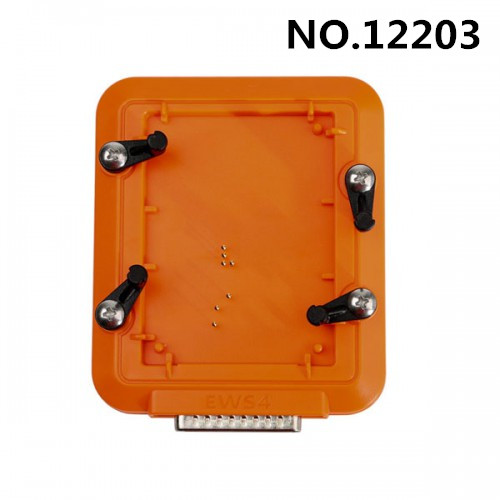
Xhorse VVDI Prog EWS4 Adapter For BMW
No.: 12203
Price: $ 35.90  
Weight: 600 g
Applicable models:


Description  
 
1. Work for VVDI Prog Programmer
2. Choose IMMO>> for BMW>>EWS4.X(ADAPTER), it displays it will need EWS4 adapter.
3. Xhorse VVDI Prog EWS4 Adapter for Easily Reading & Write for BMW EWS 4 Modules Data.

4. No Soldering is Needed, Just put EWS4 Module into the adaptor, tighten it, and then connect it to VVDI PROG.


How to use VVDI Prog EWS4 Adapter
1. Put the EWS4 module in the adapter and lock it
2. Connect VVDI PROG with EWS4 adapter, then connect vvdi prog with the computer
3. Open VVDI Prog software
4. Select Type Immobilizer, Brand for BMW, chip EWS4 adapter
5. Check connection diagram
6. Click Read ID to identify the MCU and make sure that the connection is correct to avoid possible failures
7. Chip initialization, make sure all chip type matches
8. It has to match any of them, if not, it is connected badly
9. Click Read to read EEPROM data and save it

 
[ Close ]
 
Home  |  sad fasdf asd  |  Personal information Management  |  Working time  |  About Shipping  |  About Bank Fees  |  Return Policy
Copyright @ 2013 kii-life.com All rights reserved. Address: Bao'an District, Shenzhen, China (PC: 518112) e-mail: sales @ kii- life.com